
How to Translate a Video (audio & subtitles) with Claude Code or Codex
I mainly use AI for my translation projects. There are many Chinese videos on YouTube, TikTok or Facebook that don’t offer automatic subtitles or automatic translation.
Since I want to understand them, I created a project capable of automating much of the process: transcribe the video, translate the subtitles and, if needed, go as far as automatic dubbing into French.
From this same base, it’s also possible to automatically create clippings, that is, short excerpts from the video.
In this article, I’ll use the example of translating Chinese → French. But the principle can be adapted to virtually any language. I strongly encourage you to use Claude Code or Codex CLI – on the command line.
Why use transcription rather than OCR?
Chinese videos often have Chinese subtitles directly burned into the image. So we could use OCR (optical character recognition) to extract these subtitles.
After several attempts, however, I realized that this method was quite long and complicated. In the end, it’s simpler to start directly from the speech in the video and convert it to text using an automatic transcription system called ASR (Automatic Speech Recognition).
The principle is therefore quite simple:
Video → Chinese transcription → correction → French translation → French subtitles → possibly dubbing
Preparing the skill
To automate this process, I recommend preparing a few reference files in advance in the skill. They contain the rules that the agents must follow. This makes it easy to change the system’s behavior without having to rewrite the entire workflow.
references/
├── translation_rules.md   # translation rules
├── glossary_zh_fr.md      # proper nouns and recurring terms
├── formatting_rules.md    # subtitle display rules
└── quality_check.md       # quality checks
These files can be prepared with the help of AI. I simply suggest asking it to propose several variants or a few translation examples, then choosing the tone and rules that suit you.
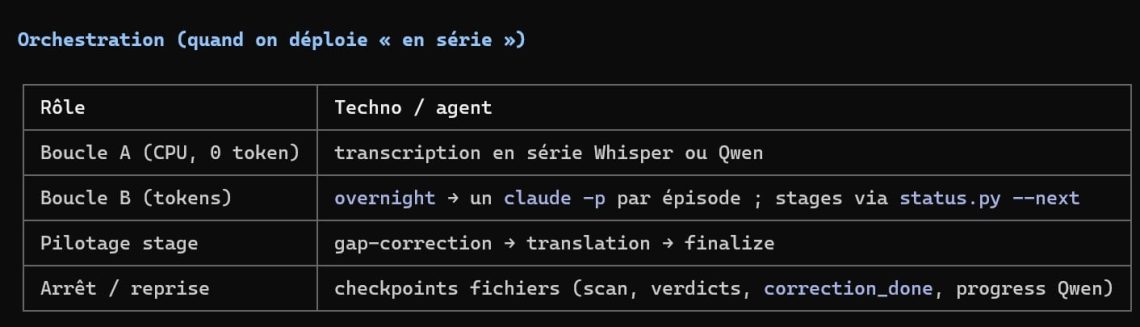
To avoid overloading the main session with the text of the entire video, the workflow can then use autonomous agents. Each agent receives only the information and reference files it needs. For example, one agent can handle transcription, another translation, and another quality control. The main session is mainly used to orchestrate the different steps.
The complete process
1. Convert Chinese speech into subtitles
We start by downloading the original video. For YouTube, Facebook or TikTok, we can use yt-dlp.
We then use a speech recognition system (ASR) to convert the Chinese speech into text. The result is a subtitle file .srt containing the Chinese text and the start and end times of each segment.
We can notably use:
- faster-whisper (medium)
- Qwen3-ASR ForcedAligner
For Chinese, I prefer Qwen3-ASR. Among other things, it lets you provide context before transcription, which can help the model pick the right character when several words sound the same.
If you then plan to do dubbing or clipping, also enableword-level timestamps. That way you’ll get much more precise alignment between the text and the voice.
2. Recover passages that weren’t transcribed
Automatic transcription isn’t always perfect. Background music, for example, can throw off the ASR. The system may sometimes treat a passage as music or singing and fail to transcribe the speech correctly.
To spot these issues, you can search the SRT file for unusually long gaps between two subtitles.
For each missing passage:
- extract the corresponding passage with ffmpeg ;
- listen to it again;
- run transcription again on just that passage.
This lets you fill in the transcription without having to reprocess the whole video.
3. Fix the Chinese transcription
ASR can make mistakes, especially with homophones : the model recognizes the sound correctly but picks the wrong Chinese character or word.
So you reread the suspicious passages and fix the transcription before starting the translation.
A bad transcription usually leads to a bad translation. This step therefore deserves special attention.
4. Translate Chinese into French
Once the Chinese transcription is corrected, it’s split into segments. The segments are then processed by an autonomous agent specialized in translation.
The agent consults the skill’s reference files in particular to follow the rules defined in advance:
- language level and register;
- natural French rather than word-for-word translation;
- translation of proper nouns;
- recurring terms from the glossary;
- rules specific to dialogue.
The translations are then assembled while preserving the timestamps from the Chinese file. For long videos, it’s better to work one segment at a time. Autonomous agents can then process the text without saturating the main session’s context.
5. Check and clean up the translation
Once the translation is done, several automated checks are run:
- no Chinese characters should remain in the French file;
- the SRT format must be valid;
- the timings must be consistent;
- the tone must remain consistent;
- the translation must stay coherent from beginning to end.
Another agent can then carry out a critical Chinese ↔ French review. Its job is to look for mistranslations, omissions, and translations that change the original meaning. This check is especially useful when the translation was done segment by segment: it helps ensure the whole thing stays coherent.
Finally, the subtitles are prepared for on-screen display:
- the text is split at natural points;
- the text is spread over one or two lines;
- the length and readability are checked;
- you make sure no word has been lost.
The original Chinese file is kept as a reference so the two versions can be compared.
6. The final result
The main result is a file:
video.fr.srt
It contains the French subtitles along with their timings.
From this file, you can then:
- burn the French subtitles into the video with ffmpeg;
- generate a French-dubbed version (text-to-speech, using the free Edge or Mac voices);
- automatically create clippings or video excerpts from the subtitles and their timestamps.
In summary
The complete workflow can be summed up like this:
Chinese video → transcription → correction → translation → quality check → French subtitles → dubbing / clippings
The value of this setup is that it clearly separates the different tasks and lets autonomous agents handle the bulkiest parts. The main session stays light and focuses on orchestrating the workflow.
