

Claude Code for Dummies: My Feedback
After months of packing boxes, JB finally got back in front of his big screen and started coding again. He was so into Claude Code that I asked him to do a demo (create and launch a website in under 3 minutes) and I gave it a try too.
I’m not a dev, but I can code a bit. I know what an algorithm is, I’ve written quite a few automated scripts, and I use APIs (= “gateways” that let one program talk to another program) like Google’s or Bing’s.
My main project: translating old books
For years, I’ve been translating old booksas a volunteer. To do that, I used the Claude API (= I paid Claude per use to translate). It’s expensive, so my scripts weren’t very demanding and I didn’t move very fast. Still, I’ve translated 1,800 pages so far, which I proofread and corrected all by myself. When I understood what Claude Codecould really do, I got back to work.
Claude Code vs ChatGPT: What’s the Difference?
When you use ChatGPT or Claude.ai in your browser, you’re in a chat interface : you ask a question, the AI responds, that’s it. It can’t see anything on your computer. It can’t open your files, run a program, or edit a document. It just responds in a text box, and you have to do everything yourself afterward. It also has limited memory and context of what you’ve done before.
Claude Codeit’s completely different. It runs directly on your computer, in the terminal (= the black window with text that devs use). And there, it gets its hands dirty: it can read and modify your files (in an authorized folder), execute code, run commands, create folders, call APIs, run tests, … It really acts on your machine, not just in a chat box.
It’s the difference between someone giving you advice from their couch over the phone, and someone who’s there physically, sitting next to you, who can open your drawers, read your documents, and do things for you.
That’s why it’s called an agent : it doesn’t just respond, it acts.
Tips that helped me
A friend, Kevin (I highly recommend reading his presentation), told me I needed to
- challenge the AI
- and have it check its work at every step.
JB told me to regularly remind the AI to document the process in a file called CLAUDE.md, ask if the AI has questions, and ask the AI to always give me its detailed plan before executing anything (on Claude, this is called “plan mode“).
What is CLAUDE.md?
You know how it is when a new colleague joins a company? On their first day, they don’t know anything: how the team works, the habits, the unwritten rules, the ongoing projects. You have to re-explain everything from scratch.
Claude Code is the same. By default, at each new session, it doesn’t remember anything. Everything you’ve done together, all the decisions made, all the preferences you’ve explained… gone.
The CLAUDE.md is the file that fixes this problem. It’s a simple text file that lives in your project, and Claude automatically re-reads it every time it starts. It’s its permanent memory. Its welcome booklet. Its logbook.
However, in ~/.claude/settings.json, you need to disable memory because memory contains all sorts of stuff and unnecessarily weighs down the context.
"autoMemoryEnabled":falseWhy Claude Code changes everything for my translations
Before, I used the API alone, with limited tools. Now with Claude Code, I can give it access to lots of files at the same time: a glossary, translation examples, .epub books on the same topic. It’s much more convenient than before and the translation quality is much better. I read translated passages at random, and with Claude Code, I didn’t find any mistakes.
The problem: tokens
Tokens are the unit that measures what the AI reads and writes. It’s like renting brain time. The more text you give it, the more you consume, and the more it costs. And I burn through them very quickly.
For less complex tasks, Kevin and JB advised me to use Deepseek (a Chinese model) with Claude Code (the interface that talks to the model, it’s called a harness, see explanation below). The Deepseek model is slightly less good than Claude’s, but it’s infinitely cheaper (divided by about 25). The value for money is exceptional. JB and I share an account at $25-30 per month that lets us consume billions of tokens, which would be unaffordable with Claude’s models.
And precisely, not running out of tokens makes us completely irresponsible ! On Deepseek, we never clean up conversations (/clear, /compact), we don’t optimize anything. On Claude, on the other hand, since we only have a $20/month subscription each and it goes fast, we’re very careful: we optimize regularly, we audit our processes to save tokens. People like us are polluting the planet, not cool!!!
Claude Code is what’s called a “harness” (= an interface, a shell). Imagine a robot with arms. The arms, the grippers, the fact that it grabs objects, moves them, opens drawers, presses buttons… that’s the harness. It’s the one that does concrete things in the real world. But the head, the one that thinks and decides what to do with these arms, you can change it. You put a very smart head for complex tasks, a more basic head for simple tasks. The robot’s body stays exactly the same, you just change what’s on its shoulders.
Claude Code is the same. The harness is the arms: it reads your files, runs commands, edits documents, manages steps one after another. That’s fixed, it doesn’t change. But the head inside, the one that thinks and writes, you can change it! With a bit of technical configuration, you can put Claude Opus, Sonnet, or Haiku of course, but also Deepseek, GPT Sol, or Gemini. The arms stay the same, you just change the head. It’s very handy: you put a powerful head for complex tasks (Claude Fable 5), a cheaper head for simple tasks (Deepseek).
Reading the technical docs changes everything
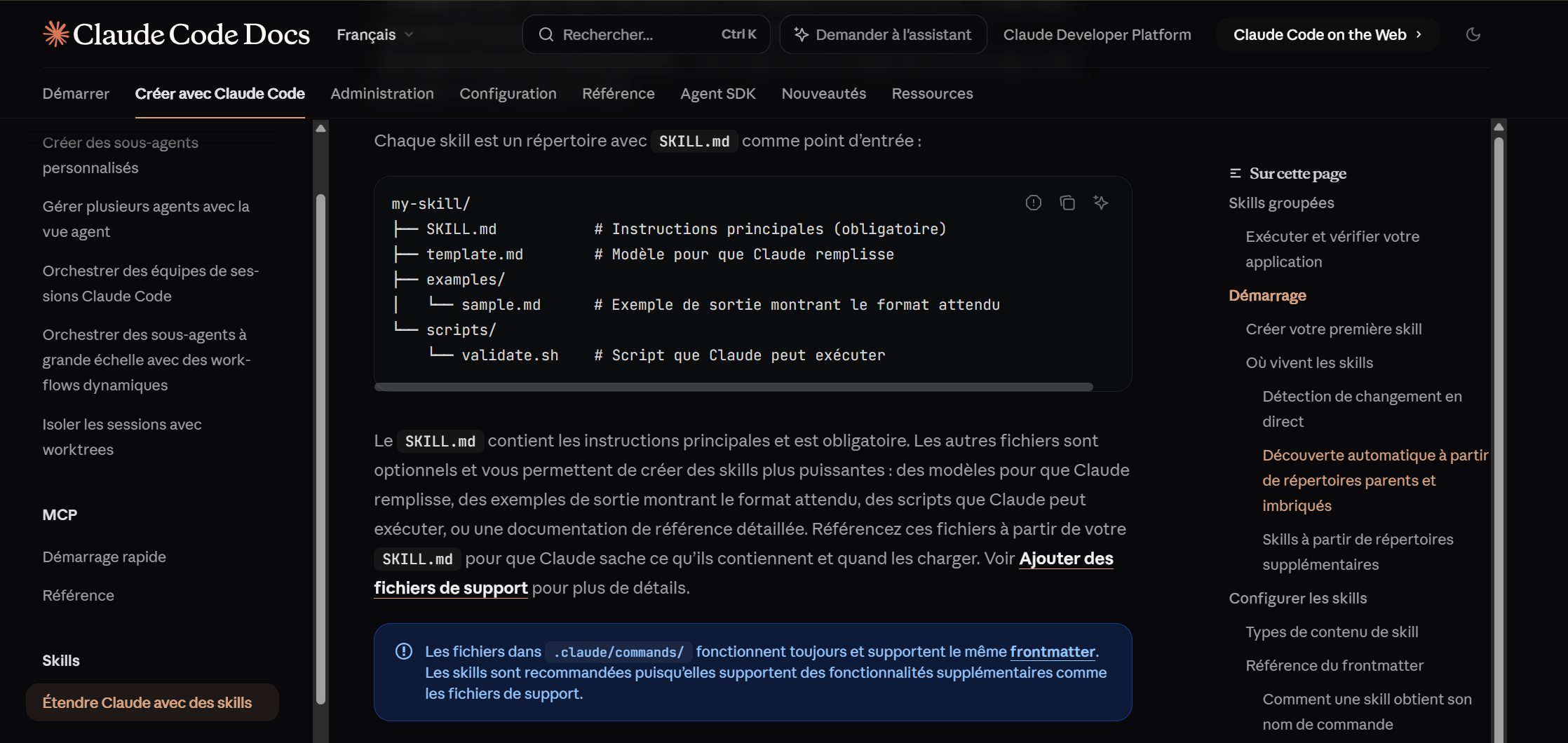
JB always says that the one who reads the technical docs has more advantages than others. And since I love reading technical docs, I read them for both of us! That’s how I discovered features that Claude doesn’t offer by default (/skill, sub agents, agent teams) : you have to ask it to audit the process, and then it optimizes everything.
What are skills and sub-agents?
By default, when you work with Claude Code, it does everything itself, alone, step by step. That’s fine, but it’s not optimal.
Skills (= competencies)are like work sheets you prepare in advance. For example: “when you translate, here’s exactly how you should behave, here’s the glossary to follow, here’s the expected style.” Instead of re-explaining every time, it pulls from its sheet and starts off on the right foot. That avoids repeating the same instructions and improves the quality of the result.Sub-agents (i.e., sub-assistants), that’s even more powerful. Instead of having a single Claude doing everything, you have several working in parallel, each on a specific task. A bit like a team. In my case for translations, it’s huge: instead of a single agent translating then checking then correcting, I have a “translator” agent that translates and another “editor” one that reviews and challenges the first’s work. The result is much better, and it’s faster.
The different models
For translations, I’ve always loved the quality of Claude Sonnet 4.6.
For the big checks, I recently discovered Claude Fable 5 and I’m really happy with it. It’s fast, surgically precise, and it sees beyond what’s asked. It consumes a huge amount of tokens per session (each session costs me the equivalent of $25 if we went through the API), but in the end it handles complex tasks in fewer sessions than other models (I threw an entire book at it, and it noticed translation inconsistencies and can cite 3 different places in the book to justify the choice of a word at the 4th place). I’m glad I have it in my Claude Pro subscription until June 22.

Deepseek V4 Pro thinks too fast and writes scripts of questionable quality. You have to force it to think and propose solutions before coding, otherwise it charges headfirst, breaks everything, and debugging becomes a nightmare. I use it for basic tasks (creating simple websites, scripts for making epubs).
My takeaways
Working with AI requires switching to manager mode and not executive mode. Instead of thinking “how are we going to do it”, I have to switch and think “what result do I want, no matter how it gets there”. For example, for a translation: I don’t care if it splits my text into 2 or 4, that’s its problem. My problem is having the best possible translation, with a consistent style from start to finish. It’s up to it to figure out how to get there. The rare times I tell it what to do (“write a Python script”, “send that in batch”), it’s micro-management, and it directly translates into inefficiency. Instead of finding the best technical solution, it follows MY technical solution, which isn’t necessarily the right one. It’s like hiring an expert and dictating their every move instead of explaining what you want to achieve. They’ll inevitably be worse than if you’d just given them the goal. We can also think in terms of process and teams: I want a translator, a second one to check the quality of the translation, a web designer, …
I still sometimes hold myself back by telling myself “whoa that looks complicated, I’m not going to ask for that”. Big mistake. I have to remind myself that there are absolutely no limits. A concrete example: I want to offer .epub files (i.e., digital books) accessible to everyone. But for my reMarkable 2 e-reader (i.e., a special tablet for reading and taking notes), the epubs need to be in a somewhat specific format. If a human were doing this work, I’d feel guilty asking for extra effort just for 0.5% of readers. So I’d self-censor. But here it’s an AI. It doesn’t get tired, it doesn’t sigh, it doesn’t watch the clock. Asking it to generate two versions instead of one costs it nothing. My immense pleasure of reading an ebook perfectly suited to my e-reader is absolutely not a whim, it’s just an additional result I’d have been wrong not to ask for. The rule I must apply to myself: if I hesitate to ask for something because “it’s too much”, I ask anyway. With AI, you can demand perfection, unlike a human.
Update: I realized I hold myself back less when I have a nearly unlimited number of tokens. So if you think you can go further, get the $200 package just for one month so you don’t limit yourself and learn as much as possible, then switch back to the $20 plan.
I discovered that you can take control of the software already installed on your computer via the command line. So, instead of using AI for OCR (Optical Character Recognition) and burning tokens, I was able to run OCR via the command line to control ABBYY software. And update flashcards with my ANKI software. So just because a tool doesn’t have an API/MCP doesn’t mean you can’t interact with it. Don’t hesitate to tell it to scan the software you already have, to save tokens.
Last but not least, and I really recommend this to everyone: find yourself a buddy to talk about Claude Code with. You become absolutely crazy about this tool, in the best sense of the word. You have an irrepressible urge to talk about it to someone. If that someone already has experience, even better: you can ask them about best practices, show them what Claude replied, and ask if it’s normal. I’m convinced that one hour of discussion with someone who has a year of Claude Code behind them easily saves you 3 months of solo trial and error. And it also allows you to share the frustration of running out of tokens. Between addicts, it’s very important to hang out with other addicts! ahahah
Seriously, it’s also very useful for keeping up with new developments. So many things come out every day that it’s impossible to test everything alone. If each person tests something on their own and talks about it with others, you cover much more ground together.
And finally, there’s the FOMO (= Fear Of Missing Out, the fear of missing something, of falling behind). This FOMO is very real. When you see how fast AI allows you to progress, you have only one fear: that your competitor advances faster. And that anxiety can only be truly understood by those who use these tools daily. So yes, find your buddy.
If you need demos and practical, more complex examples, here’s a presentation generously shared by Kevin Richard (our friend, whom I highly recommend you follow on YouTube , and X). This presentation is important because it will wake up a lot of people (at least it woke me up, that’s for sure!).

